How an Itinerary Receipt is Structured
Since 2008, almost all airlines worldwide have abolished paper ticket forms, and now you fly with an itinerary receipt.
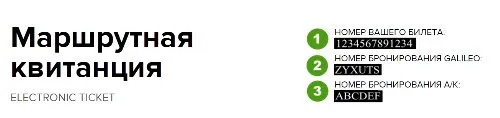 1 - is your electronic ticket number.
2 - the booking number in the global booking system Gallileo. It is by this number that you can check your airline ticket
3 - the booking number in the airline's system. When you call the airline to check your ticket or for any other question, you must provide this 6-digit number.
1 - is your electronic ticket number.
2 - the booking number in the global booking system Gallileo. It is by this number that you can check your airline ticket
3 - the booking number in the airline's system. When you call the airline to check your ticket or for any other question, you must provide this 6-digit number.
 Passenger data must be indicated according to the passport. If you are flying within Russia or the CIS with a general civil passport, the correctness of the spelling of the surname and first name is not very important; when booking, simply write your data in Latin characters.
If the flight is international, then you need to be very careful. We have already written about mistakes in an airline ticket. But, just in case, let's remind you. If the error does not distort the pronunciation of the first or last name, most airlines will overlook it. As for the passport number, there's no need to worry at all. A remark with the correct passport number can be added to the ticket for free at any time before departure.
Passenger data must be indicated according to the passport. If you are flying within Russia or the CIS with a general civil passport, the correctness of the spelling of the surname and first name is not very important; when booking, simply write your data in Latin characters.
If the flight is international, then you need to be very careful. We have already written about mistakes in an airline ticket. But, just in case, let's remind you. If the error does not distort the pronunciation of the first or last name, most airlines will overlook it. As for the passport number, there's no need to worry at all. A remark with the correct passport number can be added to the ticket for free at any time before departure.
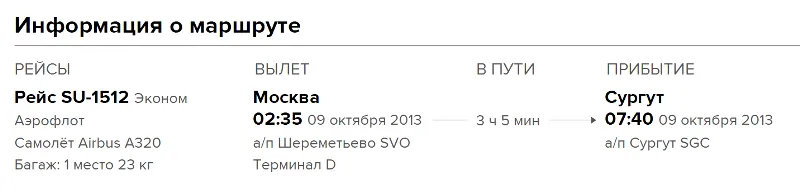 The itinerary information allows you to double-check all data. Check it as soon as you receive the itinerary receipt; if you notice an error, immediately call the kupi.com call center or write to privet@kupi.com.
If the error was corrected before 24:00 (Moscow time) on the day the ticket was purchased, you still have a chance to make changes without penalties. If you didn't manage to, you will have to exchange or refund the ticket, in accordance with the fare rules. Remember that most cheap airline tickets are - non-refundable.
But let's return to the itinerary receipt.
In the FLIGHTS column, you will see your flight number. As a rule, it is written with the airline identifier; in this case, SU means Aeroflot.
Here you will also find information about the aircraft you are flying on - Airbus A320. Thanks to this, on the SeatGuru website, you can view the configuration and seating arrangement on the aircraft and choose the best seat in advance, which you can then reserve during online check-in.
The itinerary information allows you to double-check all data. Check it as soon as you receive the itinerary receipt; if you notice an error, immediately call the kupi.com call center or write to privet@kupi.com.
If the error was corrected before 24:00 (Moscow time) on the day the ticket was purchased, you still have a chance to make changes without penalties. If you didn't manage to, you will have to exchange or refund the ticket, in accordance with the fare rules. Remember that most cheap airline tickets are - non-refundable.
But let's return to the itinerary receipt.
In the FLIGHTS column, you will see your flight number. As a rule, it is written with the airline identifier; in this case, SU means Aeroflot.
Here you will also find information about the aircraft you are flying on - Airbus A320. Thanks to this, on the SeatGuru website, you can view the configuration and seating arrangement on the aircraft and choose the best seat in advance, which you can then reserve during online check-in.
 Here you will see information about the fare, taxes, and fees of kupi.com
Fare - this is the cost of the airline ticket from the airline; it is from this amount that penalties and various fees are deducted when exchanging or refunding a ticket.
Taxes - these are airport and other service taxes and fees. Part of this amount can usually be refunded when returning a ticket, but it's worth noting that the main part of the taxes is the fuel surcharge, which in most cases cannot be refunded.
Fees - this is the amount that kupi.com charges for issuing this ticket; it is also non-refundable upon return. Some airline tickets are sold without fees, in which case, this column will show - 0.
Here you will see information about the fare, taxes, and fees of kupi.com
Fare - this is the cost of the airline ticket from the airline; it is from this amount that penalties and various fees are deducted when exchanging or refunding a ticket.
Taxes - these are airport and other service taxes and fees. Part of this amount can usually be refunded when returning a ticket, but it's worth noting that the main part of the taxes is the fuel surcharge, which in most cases cannot be refunded.
Fees - this is the amount that kupi.com charges for issuing this ticket; it is also non-refundable upon return. Some airline tickets are sold without fees, in which case, this column will show - 0.
Electronic ticket - is just a record with flight and passenger data in a database.When purchasing an airline ticket, an electronic record is automatically created in the database, and in confirmation of this, you receive an itinerary receipt. Therefore, there's no need to worry if you lose or forget it; to board a flight, it's enough to present your passport during flight check-in. Please note that the security service of some airports asks passengers to print out the receipt, and at check-in, they will find you faster with it, especially if it's a complex flight with a layover. Every airline ticket booking service or airline develops its own itinerary receipt form. Today we will talk about the itinerary receipt of kupi.com
How is the kupi.com itinerary receipt structured?
1 - is your electronic ticket number.
2 - the booking number in the global booking system Gallileo. It is by this number that you can check your airline ticket
3 - the booking number in the airline's system. When you call the airline to check your ticket or for any other question, you must provide this 6-digit number.
Passenger data must be indicated according to the passport. If you are flying within Russia or the CIS with a general civil passport, the correctness of the spelling of the surname and first name is not very important; when booking, simply write your data in Latin characters.
If the flight is international, then you need to be very careful. We have already written about mistakes in an airline ticket. But, just in case, let's remind you. If the error does not distort the pronunciation of the first or last name, most airlines will overlook it. As for the passport number, there's no need to worry at all. A remark with the correct passport number can be added to the ticket for free at any time before departure.
The itinerary information allows you to double-check all data. Check it as soon as you receive the itinerary receipt; if you notice an error, immediately call the kupi.com call center or write to privet@kupi.com.
If the error was corrected before 24:00 (Moscow time) on the day the ticket was purchased, you still have a chance to make changes without penalties. If you didn't manage to, you will have to exchange or refund the ticket, in accordance with the fare rules. Remember that most cheap airline tickets are - non-refundable.
But let's return to the itinerary receipt.
In the FLIGHTS column, you will see your flight number. As a rule, it is written with the airline identifier; in this case, SU means Aeroflot.
Here you will also find information about the aircraft you are flying on - Airbus A320. Thanks to this, on the SeatGuru website, you can view the configuration and seating arrangement on the aircraft and choose the best seat in advance, which you can then reserve during online check-in.
Keep in mind that the airline has the right to change the aircraft type at any time, without any compensation.The last part of the itinerary receipt is Payment Information.
Here you will see information about the fare, taxes, and fees of kupi.com
Fare - this is the cost of the airline ticket from the airline; it is from this amount that penalties and various fees are deducted when exchanging or refunding a ticket.
Taxes - these are airport and other service taxes and fees. Part of this amount can usually be refunded when returning a ticket, but it's worth noting that the main part of the taxes is the fuel surcharge, which in most cases cannot be refunded.
Fees - this is the amount that kupi.com charges for issuing this ticket; it is also non-refundable upon return. Some airline tickets are sold without fees, in which case, this column will show - 0.